LeetCode time tracker and analytics

Time every problem. See where you’re strong and where you’re slow.

CPTracker times each LeetCode session, tried or solved, then shows your average solve time by difficulty and by topic, so you know what to practice next.

  • Time every attempt

    Solved or just tried, every session adds to your total.

  • Solve time by difficulty

    Your average for Easy, Medium and Hard, and whether it’s improving.

  • Strong and weak topics

    Which topics you solve faster than your average, and which slow you down.

Analytics

Then see what your time tells you.

Every tracked minute feeds your analytics. Pick the last week, two weeks or month.

How long each difficulty takes you

See your average solve time for Easy, Medium and Hard, and whether you’re faster than the period before.

  • Average solve time per difficulty
  • Change from the previous period
  • Time spent each day, split by difficulty
Easy12m↓ 10%
Medium27m↓ 8%
Hard49m↑ 5%
Daily time
EasyMediumHard
Mon
Tue
Wed
Thu
Fri
Sat
Sun

Your strong and weak topics

Each topic’s average solve time is compared with your own overall average, so you can see where you’re quick and which topics to practice next.

  • Average solve time per topic
  • Faster or slower than your average
  • Problems solved per topic, by difficulty
Topics vs your averageYour average solve time: 20m
FasterSlower
  • Hash Table32% faster
  • Two Pointers18% faster
  • Sliding Window8% faster
  • Binary Search12% slower
  • Dynamic Programming41% slower
  • Graph56% slower

Why time

Your solved count doesn’t show the work. Your time does.

An hour on a hard problem you didn’t crack is still an hour of practice. Mark it Tried and it counts. Here’s the same example week, seen both ways.

Solved count

2problems solved

Mon
Tue
Wed
Thu
Fri
Sat
Sun

Time tracked with CPTracker

SolvedTried

4h 35macross 5 days

45m
Mon
1h 10m
Tue
1h 30m
Wed
20m
Thu
50m
Fri
Sat
Sun

How it works

Add a problem, start the timer, get back to solving.

  1. 01

    Add a problem

    Paste a LeetCode link on your dashboard, or open the extension on the problem page.

  2. 02

    Start the timer

    Solve at your own pace. The timer is kept on our side, so closing the tab won’t stop it.

  3. 03

    Finish with notes

    Write your approach and complexity, then mark it Tried or Solved.

  4. 04

    Learn from it

    Check your averages by difficulty and topic, then pick what to practice next.

Chrome extension

Track without leaving LeetCode.

Open the panel on a problem to add it, run the timer and write notes, right next to your code.
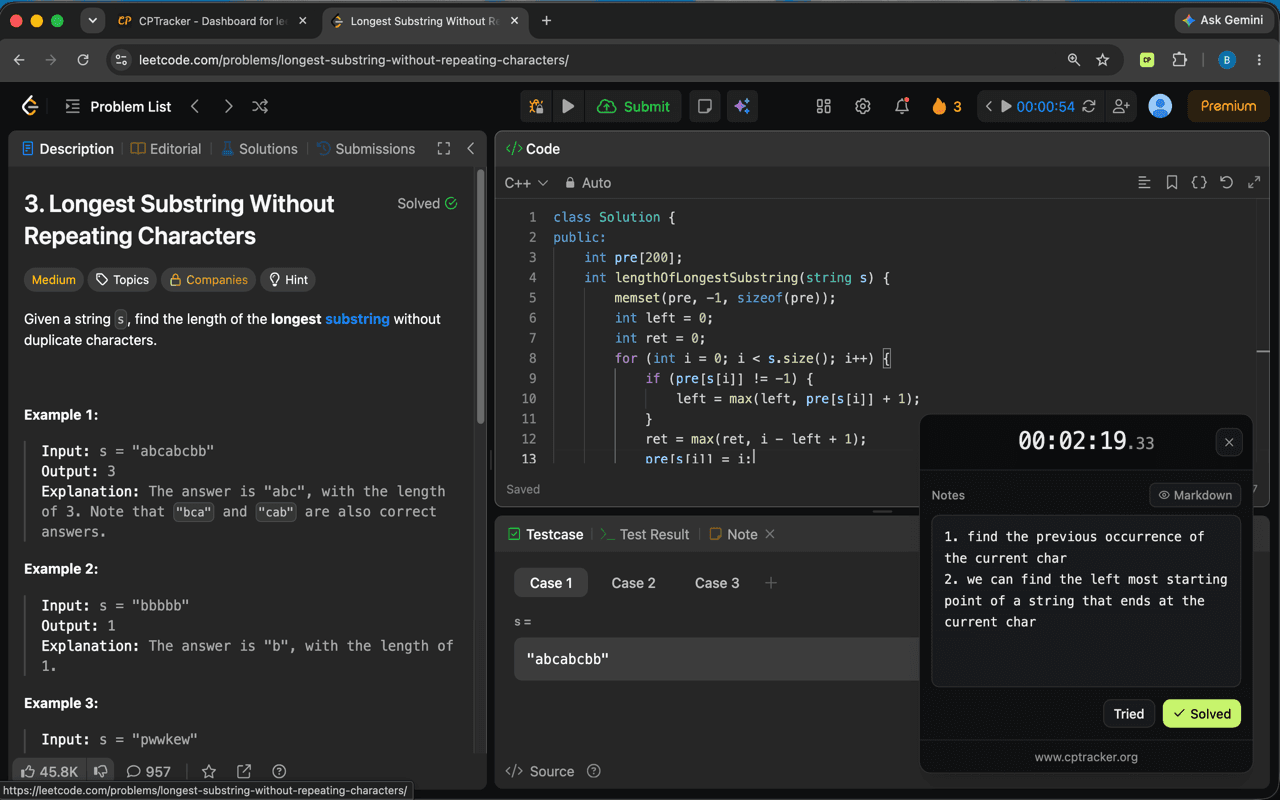
The CPTracker extension panel open on a LeetCode problem with the timer running

FAQ

Good to know.

Is it free?
Yes. Sign in with GitHub or Google and start tracking.
How are strong and weak topics decided?
By comparing each topic’s average solve time with your own overall average, for the same difficulty.
Do I need the extension?
No. You can paste links and run the timer from the dashboard. The extension just saves you the tab switching.
Is it open source?
Yes, under the MIT license.

Find out where your time really goes.

Time your next problem. Your analytics start from there.

Get started